
Why register to EasyPark.bm?
Registering to EasyPark will enable you to take advantage of the following online services:
- Access to reporting that provides detailed parking information for cost control, in support of parking ticket defense or other needs.
- Protection of your EasyPark meter against theft or lost; by registering your unit online you can immediately make an online request to block or mark your unit as lost or stolen. Otherwise, you will have to physically visit our office to provide the original purchase and personal identification documents in order to block your lost or stolen EasyPark device.
- Online purchase of an EasyPark device and any related accessories (when available).
- Access to configure and use your EasyPark Mobile account
- Access to our Knowledge Base that provides detailed information about the use of the EasyPark Meter, Mobile and related services.
- Online support tickets. You can submit issues online and monitor related progress.
- Timely access to information about changes to EasyPark’s service or any special promotions.
- Online Top Up of your EasyPark Meter and/or EasyPark Mobile account.
How to register my EasyPark Meter?
After registering to EasyPark Meter (see above), select the icon “My EasyPark Meters” and enter the eight digit number shown on the face of your device together with date of purchase, invoice number, place of purchase and any additional information required. Then select “Enter” to register your device.
Note: Each EasyPark Meter has a unique number and cannot be registered twice. So if you are registering a second-hand purchased device, please ensure the seller of the meter releases the EasyPark meter from their registered account.
How to register my EasyPark Mobile Account?
Once you are registered to EasyPark, select thte EasyPark Mobile icon and following the Mobile account set up procedures outlined on our website. Click here for more information.
Note: if you have not previously registered with EasyPark using this website, you can register to EasyPark Mobile directly from your mobile phone. If you have already registered to EasyPark using this website, to sign into EasyPark Mobile on your mobile phone, requires your to enter the same credentials (email and password) you use to sign into this website; after following the aforementioned set up details.
For more information on our online services, please contact our office.
Information Videos
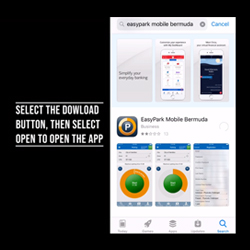
EP Mobile Registration
Mobile Gated Parking
EasyPark Mobile